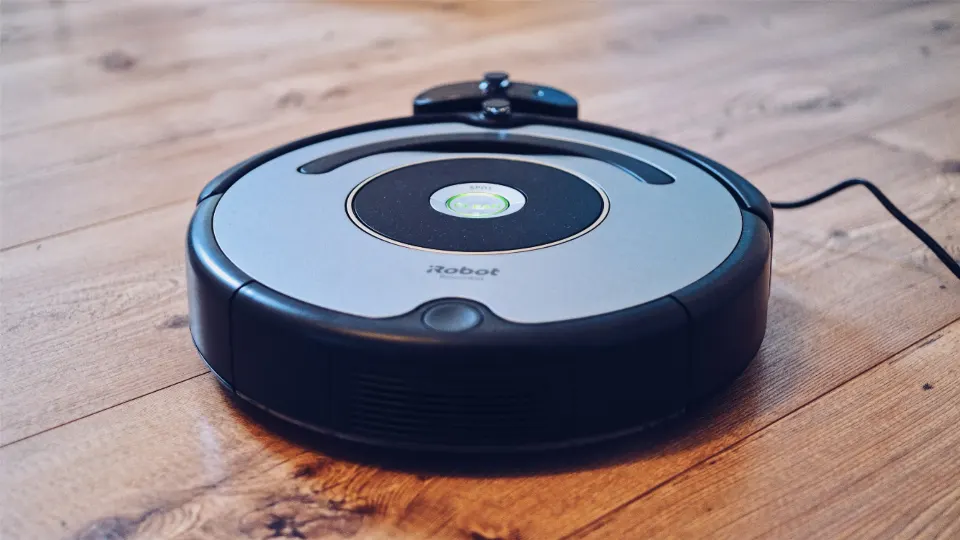
How to Choose a Robot Vacuum (2026): Navigation to Docks
We may earn a commission when you buy through links on our site, at no extra cost to you. Learn more
Quick answer
For most homes, pick LiDAR navigation first, then add a self-empty dock only if you hate emptying a bin. The Roborock Q5 Pro is a solid mapping starting point (check current stock), the Roomba Max 705 Vac suits homes worried about cords and pet accidents, and the eufy X10 Pro Omni is for people who also want hands-off mopping. On a tight budget with a small, mostly hard-floor home, the eufy RoboVac 11S MAX does the basics without an app.
Choosing a robot vacuum comes down to four decisions: how it finds its way around, what it does with the dirt, whether it mops, and how well it copes with your floors. This guide explains each one in plain terms and shows five example models, from a no-app budget unit to a full mop-washing station.
To keep it honest, we compared manufacturer specs, product pages and independent reviews, and we summarize owner reports as patterns. We do not test the robots ourselves, so treat the example models as illustrations of each tier rather than a ranked list.
Below you will find how navigation types differ, a table of dock types, a comparison of the example models, and scenarios that match a robot to a real home.
Our Recommended Picks
- 2.85-in Low Profile
- Random Navigation
- No App or Wi-Fi
eufy RoboVac 11S MAX
6.1/10 our score
A slim, quiet bump-and-go vacuum with no app and no mapping. It shows what you give up, and what you save, by skipping smart navigation.
- LiDAR Navigation
- 5,500Pa Suction
- Up to 240-Min Runtime
Roborock Q5 Pro
7.9/10 our score
Real LiDAR navigation, 5,500Pa suction and a long battery, with a basic wet pad if you want light mopping. The Q5 Pro+ adds a self-empty dock.
- Bagless Self-Empty Base
- LiDAR Room Mapping
- Self-Cleaning Brushroll
Shark AI Ultra Robot Vacuum
7.8/10 our score
A LiDAR-guided vacuum with a bagless self-empty base, so there are no dust bags to buy.
- Camera + LiDAR
- 13,000Pa Suction
- Bagged Dock, Up to 75 Days
iRobot Roomba Max 705 Vac
8.1/10 our score
iRobot's vacuum-only model pairs a front camera with LiDAR to avoid cords and pet waste, and empties into a sealed bag dock. iRobot has since added the Max 715 Vac, so check which one is in stock.
- 8,000Pa Suction
- Dual Mops, 12 mm Lift
- Wash and Dry Station
eufy X10 Pro Omni
8.3/10 our score
A station that empties dust, washes and dries two spinning mop pads and refills water. eufy's newer C28 is listed as its upgrade.
Navigation Types Explained (Random, Camera, LiDAR)
Navigation decides how fast a robot cleans, whether it covers the whole floor and whether you can control it by room.
| Navigation | How it works | Strength | Weakness |
|---|---|---|---|
| Random / bump | Bumps into obstacles and changes direction | Cheapest, simple | Uneven coverage, no maps |
| Camera (visual) | Matches ceiling and room features | Maps without a spinning laser | Needs light, less precise |
| LiDAR | Spinning laser measures distances | Accurate maps, works in the dark | Cannot see thin cords |
| Camera + LiDAR | Laser map plus object recognition | Avoids cords and pet waste | Higher price |
If you choose only one upgrade, choose LiDAR. It is what lets you pick a room, set a no-go zone around a pet bowl and have the robot return to where it stopped. Our robot vacuums under $300 roundup shows how many LiDAR models now sit in that range.
Dock Types and What Each One Does
| Dock | What it handles | Ongoing cost | Space needed |
|---|---|---|---|
| Charging base only | Recharging | None | Small |
| Self-empty, bagged | Empties bin into a sealed bag | Bags | Medium |
| Self-empty, bagless | Empties bin into a container | None | Medium |
| Wash-and-dry station | Empties, washes and dries mops, refills water | Bags, solution | Large |
A dock matters more than a few thousand extra Pa of suction for most people. A robot that empties itself actually runs daily, while one that needs a bin dump after every pass often does not.
Example Models Compared
| Model | Navigation | Suction (listed) | Dock | Mop |
|---|---|---|---|---|
| eufy RoboVac 11S MAX | Random | 2,000Pa | Charging base | None |
| Roborock Q5 Pro | LiDAR | 5,500Pa | None (Pro+ has a dock) | Wet pad |
| Shark AI Ultra Robot Vacuum | LiDAR | — | Bagless, up to 60 days | None |
| iRobot Roomba Max 705 Vac | Camera + LiDAR | 13,000Pa | Bagged, up to 75 days | None |
| eufy X10 Pro Omni | Laser + AI camera | 8,000Pa | Wash, dry, empty | Dual pads |
Suction numbers are manufacturer claims measured in different ways, so compare them only within a brand. Brush design and software matter as much.
Suction, Brushes and Pet Hair
Rubber rollers and self-cleaning brushrolls shed hair better than bristle brushes, which tend to wrap. If pets are the main reason you are buying, see our guide to the best robot vacuum for pet hair. For thick rugs, suction and brush type matter most, and the best robot vacuum for carpet list explains how to pick.
Which Floors and Homes Need Which Robot
- Studio or one-bedroom, hard floors: a random-navigation model like the eufy RoboVac 11S MAX is enough.
- Three or more rooms, mixed floors: LiDAR, such as the Roborock Q5 Pro, saves time and lets you skip rooms.
- Dog or cat plus long hair: a self-empty dock, such as the Shark AI Ultra Robot Vacuum, is worth paying for.
- Cords, kids’ toys, pet accidents: camera avoidance, as on the Roomba Max 705 Vac.
- Tile and hardwood you want mopped: a wash station like the eufy X10 Pro Omni. If you only have hard floors, see the best vacuum for hardwood floors.
Who Should Skip a Robot Vacuum Entirely
Homes with many stairs, a lot of deep shag carpet or floors covered in clutter get little out of a robot. A cordless stick is a better main tool there, and our best cordless stick vacuum guide covers it. Robots also struggle with high thresholds, dark rugs that fool cliff sensors and tangled cords, so check the manufacturer’s stated climb height before you buy.
Frequently Asked Questions
Is LiDAR better than a camera for robot vacuum navigation?
They do different jobs. LiDAR builds a precise floor plan and works in the dark, so it is the best base for room mapping and no-go zones. A front camera recognizes objects such as cords, socks and pet waste. The best robots, like the Roomba Max 705 Vac, combine both.
Do I need a self-emptying dock?
It is a convenience, not a necessity. Without a dock you empty a small bin after most runs. With one, the robot empties into a bag or bagless container for weeks. It matters most with pets, long hair or a large home.
Can a robot vacuum replace my regular vacuum?
For daily upkeep it can, but most owners still keep a stick or handheld for stairs, corners and deep carpet cleaning.
Are robot vacuums good on carpet?
Suction and brush design decide this. Thick or shag carpet is hard for most robots, and mopping robots should lift or cover the mop over rugs.
How long do robot vacuums last?
Manufacturers do not promise a lifespan. Batteries, brushes and filters are consumables, so check the warranty and whether parts are sold before you buy.
Final Verdict
Decide in this order: navigation, dock, mop, then floors. LiDAR is the feature that most changes daily results, a self-empty dock is worth it when you have pets or a large home, and mopping stations suit mixed hard floors but need space.
If you are unsure, start with a LiDAR model such as the Roborock Q5 Pro, then step up only for a specific problem you have, like cords on the floor or constant bin emptying.
Sources We Checked
Specs and features in this guide come from these manufacturer pages and independent sources, checked on Oct 31, 2026.